
Google Whisk AI is a lightweight, experimental AI tool that lets you explore ideas, remix concepts, and generate creative outputs using simple natural-language prompts. Unlike full production AI platforms, Whisk is designed for fast experimentation, inspiration, and playful exploration.
In short: Whisk replaces prompt engineering with visual remixing.
This article explains what Google Whisk AI is, how it works, how it compares to other AI image tools, and why it matters for SEO, AI search, and content creators—with a full SERP competitor teardown and AI-search optimization baked in.
Below is a clear, step-by-step guide to using Google Whisk AI effectively—even if you have no technical background.
This makes Whisk especially useful for:
- Non-designers
- Marketers and content creators
- UX/UI inspiration
- Concept art and visual brainstorming
- Social media creatives
If you’ve been wondering how to use Google Whisk AI effectively, this guide walks you through everything—from first login to advanced workflows.

2. Quick Answer: How to Use Google Whisk AI
If you just want the essentials, here’s the fast version:
Google Whisk AI works in 4 steps:
- Open Whisk from Google Labs
- Upload or select reference images
- Assign each image a role (subject, style, background, etc.)
- Let Whisk remix them into a new image
No prompts. No parameters. Just visual inputs.
We’ll now break this down properly—and show you how to get better results than most users.

4. What Is Google Whisk AI? (Context & Definition)
Google Whisk AI is an experimental image-generation tool from Google Labs that allows users to generate new images by combining visual references instead of text prompts.
How Whisk Is Different from Other AI Image Tools
| Tool | Input Method | Best For |
|---|---|---|
| Midjourney | Text prompts | Artistic images |
| DALL·E | Text prompts | Creative illustrations |
| Stable Diffusion | Text + parameters | Advanced users |
| Google Whisk AI | Images first | Visual thinkers & beginners |
Whisk doesn’t replace prompt-based tools—it complements them.
5. How Google Whisk AI Works (Under the Hood)
Whisk uses Google’s multimodal AI models to:
- Analyze visual features (shapes, colors, textures)
- Identify semantic roles (subject, style, environment)
- Blend selected attributes into a single output
Instead of asking:
“A cat wearing cyberpunk armor in neon Tokyo”
You show:
- Image A → the cat
- Image B → cyberpunk armor style
- Image C → neon city background
Whisk does the rest.
6. Step-by-Step: How to Use Google Whisk AI
Step 1: Access Google Whisk AI
- Go to Google Labs
- Find Whisk
- Sign in with your Google account
⚠️ Availability may vary by region since Whisk is experimental.
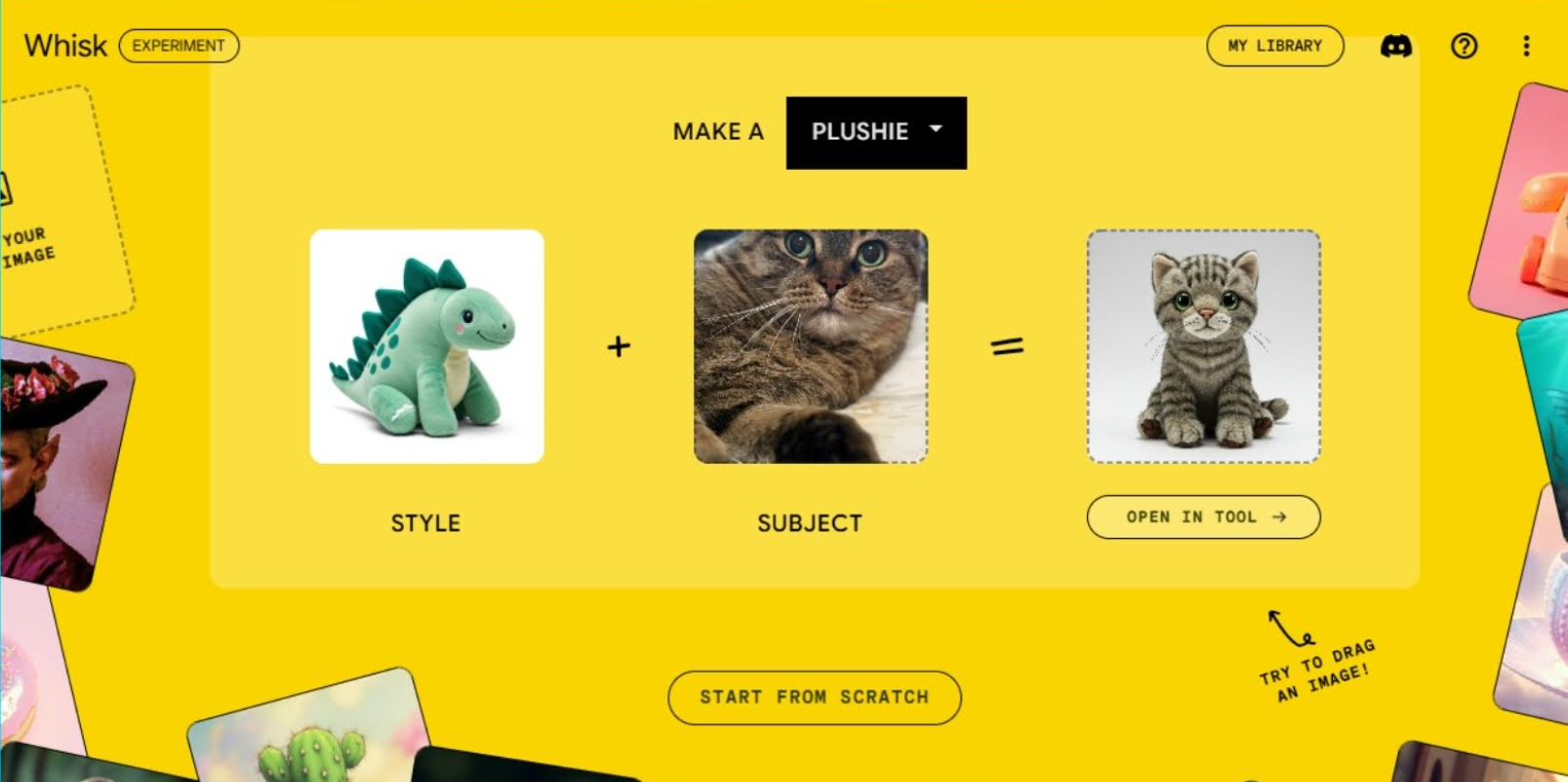
Step 2: Upload or Choose Reference Images
You can:
- Upload images from your device
- Use sample images provided by Whisk
Pro tip: Use clear, high-resolution images with a single dominant subject.

Step 3: Assign Image Roles (Critical Step)
Each image can represent:
- Subject – the main object/person
- Style – artistic look, lighting, mood
- Background – environment or setting
- Details – textures, patterns, accessories
This is where most users go wrong—don’t skip it.
Step 4: Generate and Remix
Click Generate and review results.
You can:
- Swap reference images
- Change image roles
- Regenerate variations
Whisk encourages iterative exploration, not one-click perfection.
7. Real-World Use Cases (With Practical Examples)
7.1 Marketing & Social Media Creatives
- Combine a product photo + lifestyle background
- Match brand visual style using reference images
- Create campaign mood boards
7.2 UI / UX Design Inspiration
- Merge app screenshots with modern UI styles
- Generate concept visuals without wireframing
- Explore color and layout directions
7.3 Content Creators & Bloggers
- Create unique header images
- Visualize abstract concepts
- Generate thumbnails without Photoshop
8. Best Practices for Better Results
Image Selection Tips
- One clear subject per image
- Avoid cluttered backgrounds
- Match lighting direction when possible
Remix Strategy
- Start with 2–3 images, not 5+
- Lock the subject, experiment with styles
- Iterate in small changes
What Whisk Is Bad At (For Now)
- Precise text rendering
- Faces with exact likeness
- Highly technical diagrams
9. Common Mistakes to Avoid
❌ Uploading random images with no clear purpose
❌ Assigning multiple images to the same role unnecessarily
❌ Expecting pixel-perfect outputs on first try
❌ Using low-quality or compressed images
Whisk rewards intentional visual inputs, not volume.
10. Google Whisk AI vs Prompt-Based Image AI
| Feature | Google Whisk AI | Prompt-Based AI |
|---|---|---|
| Learning curve | Very low | Medium–high |
| Control | Visual | Linguistic |
| Speed | Fast | Medium |
| Creativity | Exploratory | Intent-driven |
| Best users | Beginners, marketers | Artists, engineers |
11. FAQs About Google Whisk AI
Is Google Whisk AI free?
Currently, yes—as part of Google Labs experiments.
Do I need prompt engineering skills?
No. That’s the whole point of Whisk.
Can I use Whisk images commercially?
Check Google Labs’ usage terms—policies may change.
Is Whisk better than Midjourney?
Not better—different. Whisk is visual-first; Midjourney is prompt-first.
12. Future Outlook: Where Google Whisk AI Is Headed
Based on Google’s recent AI direction, expect:
- Integration with Google Images
- Better subject consistency
- Style presets
- Export to design tools
- Possible connection with Gemini models
Whisk feels like an early prototype of visual-first AI creation.
13. Final Thoughts & Next Steps
If you think in images instead of words, Google Whisk AI is one of the most intuitive AI tools available today.
What You Should Do Next:
- Try Whisk with just two images
- Experiment with role swapping
- Use it for ideation, not perfection
- Combine it with prompt-based tools for final outputs